The Future of Drone Insurance: Protection Against Aerial Risks

Airports grounded. Energy generation facilities disrupted. Data centers surveilled from above. The threat no longer comes through firewalls — it comes from the sky.

As drones evolve from hobby devices into advanced reconnaissance and attack tools, they’re creating an entirely new risk category for insurers and enterprises alike. While cyber risk has well-established frameworks, aerial threats are still largely undefined, yet growing impossible to ignore.

The global consensus is that rogue drones will remain a persistent threat because they’re a low-cost and high-impact. But can leaders count on “anti-drone insurance” as a possible remedy? Here’s our take.  

Drone Threats are a Global Nuisance 

Unauthorized UAV activity has spilled outside of military zones. Airports, oil refineries, power stations, and corporate campuses have been attacked all over the world. The successful 2019 drone assault on Saudi Aramco’s oil facilities was a harbinger. A July 2020 drone crash near a Pennsylvania energy substation and subsequent incidents around New Jersey, New York, Maryland, Minnesota, and Pennsylvania rattled the US operators.  

Across the pond, European leaders have been in high alert mode since February 2022 as the rate of unidentified drone flyovers increased with the start of the Russian war against Ukraine. As recently as September 2025, Denmark had to raise the security level of its energy infrastructure to the second-highest tier, following numerous drone sightings over its energy and military infrastructure. Munich Airport had to shut down twice, following suspicious drone traffic. 

Consumer drones are as cheap as ever, while jammers and spoofing kits are readily available online. Techniques once confined to conflict zones — like using low-cost drones for surveillance, sabotage, or coordinated swarm attacks — are now accessible to anyone searching well enough. 

In contrast, even “minor” incursions can cost millions for the targets. But most businesses don’t yet have effective means to soften the impacts. 

The Insurance Market is Catching Up to Drone Threats 

Traditional property or liability policies rarely account for drone-borne threats. Traditionally, losses fall into terrorism, war, or sabotage exclusions, leaving businesses uncovered. In response, carriers are trying to ‘plug this gap’ with new offerings. 

Terrorism and Political Violence Coverage

In the UK, where rogue drones became a common sight near airports, Air Force bases, industrial and correctional facilities, several drone insurance schemes are emerging. 

Pool Re’s terrorism reinsurance product now includes unmanned aircraft within “all-risks” policies for commercial properties in Great Britain. Other major carriers like AIG, Allianz, and Lloyd’s syndicates have also introduced political-violence coverage explicitly listing drone attacks as insured perils. These policies promise to cover property damage and business interruption, even when the physical impact is limited.

War-Risk and Infrastructure Protection Programs

In conflict zones, new “war-risk policies” are emerging with coverage for drone and missile-induced damage. In Ukraine, the government teamed with a local insurer, ARX,  to offer up to $50 million in coverage for assets like commercial real estate, energy facilities, and factories. 

On the flip side, however, anti-drone insurance policies in high-conflict zones come with raised premiums. Other carriers may be choosing to withdraw their policies altogether. In other words, insurers remain cautious about extending new offers in markets where drone attack risks are high. 

Operator and Liability Extensions

At the same time, standard drone pilot insurance policies, required of commercial operators in many markets, now include extended liability clauses. Insurance like AIG now offers optional hijacking and terrorism coverage, protecting pilots from liabilities if their UAVs are spoofed, jammed, or repurposed in an attack.

Building Real Protection: Beyond Drone Insurance Policy Coverage

Insurance alone won’t stop an attack. Effective drone prevention starts with testing and technology. To safeguard your assets, consider this two-step approach: 

1. Red-team / blue-team simulations

Running controlled UAV attack simulations exposes weaknesses in airspace monitoring and response protocols. Red teams attempt incursions; blue teams counter them using radar, RF, or AI-powered detection. The result: measurable data for insurance underwriting and internal risk assessments.

At Osiris AI, we run advanced drone defence simulation exercises on 3D digital twins, based on real-world geospatial and OSINT data. A red team of up to five simulates the attack path, and a blue team of the same size and skill works to repel the intrusion. 

During an after-action review, we analyze the vulnerabilities and defense gaps. Then, suggest cost-effective asset protection strategies. 

2. Counter-Drone Systems Deployment

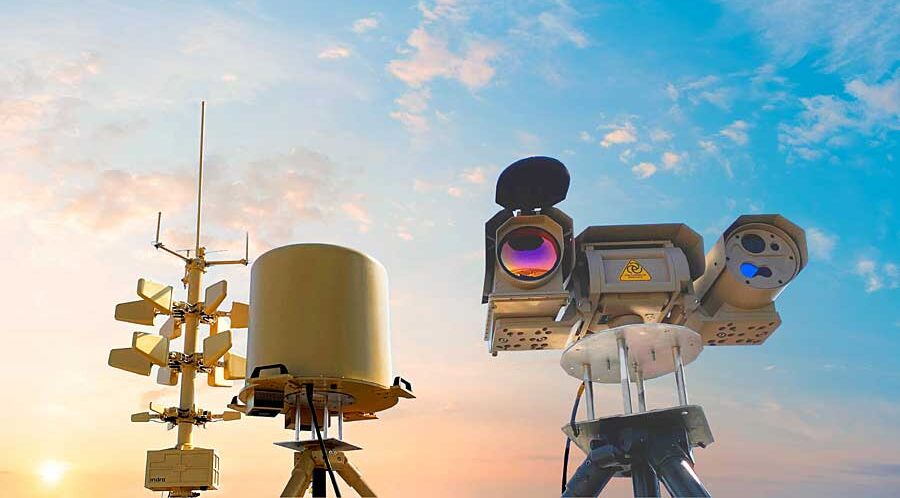
Once the vulnerabilities are known, we recommend investing in a tailored anti-drone system. Depending on your asset type, it can feature a mix of RF sensors, jammers, optical trackers, or interception drones. 

These safeguards offer baseline protection — and they can also entice insurers to consider extra policy coverage or lower future premiums. 

The Bottom Line

Aerial risk is the next frontier of operational security. As the sky becomes as contested as cyberspace, businesses that test, fortify, and insure today will be the ones still operating tomorrow.

The future of drone insurance won’t be reactive—it will be predictive, informed by live threat intelligence, counter-UAV technology, and data-driven underwriting.
Protection, after all, starts before impact.
Tactical Drone Training: Which Skills Should You Hone?

Spotting the difference between a hobbyist and a true tactical drone pilot isn’t hard once you know what to look for. The pros have one thing in common: hours of structured drone training behind their belts. 

If you, too, want to level up your flying game, start by mastering these core skills. 

1. Advanced Flight Control & Manoeuvring

Routine waypoint flying is a commodity. You need to learn how to do tight maneuvers under stress: obstacle weaving, dynamic altitude changes, aggressive turns, rapid target shifts, and reaction to unplanned contingencies (gusts, turbulence, signal latency).

Training tips: 

  • Download an FPV drone simulator with real-world physics, turbulence, latency, and sensor feedback. Our top recs are VelociDrone and LiftOff. We love them for their realistic flight dynamics, customizable environments, and excellent track-building functionality. 
  • Create challenge courses. Perfect your techniques in urban canyons, dense foliage, and around obstacle towers. Try to reduce margins with each session. For an extra challenge, practice occasional emergency recovery drills (e.g., with sensor or rotor failure).  

2. BVLOS and Long‑Range Navigation

Many tactical missions require extended reach — pipeline inspections, border patrolling, convoy overwatch. Operating beyond visibility demands higher confidence in autopilot, control link robustness, and situational awareness.

Training tips: 

  • Simulate BVLOS challenges — temporary coms link dropouts, latency spikes, and waypoint handoffs — in your simulator to stay sharp no matter what. 
  • Incorporate lost-link recovery and manual takeover drills. Fly test scenarios where your drone intentionally loses signal or GPS lock, then regains control manually or triggers autonomous return-to-home modes to ensure you can handle real communication failures with confidence.

3. Payload & Sensor Mastery

A strong hold of payload controls separates the noobs from the pros. Modern UAVs come with a great variety of payloads — EO/IR cameras, LiDAR, EW payloads, or multi-spectral sensors — and designated drone apps to control ‘em. To make the max out of these extras, you’ll need some practice with payload controls and sensor issue troubleshooting. 

Training tips: 

  • Schedule dual-imaging drills. For example, with one camera in RGB, another in IR. Task yourself to fuse both streams, classify objects, and mark targets.
  • Train payload & gimbal control while doing aggressive maneuvers — high-speed passes, tight S-turns, rapid altitude climbs, or quick yaw pivots — to build up your confidence. 

4. Electronic Warfare (EW) and Signal Resilience

Weak GPS signal and high interference are often part of flying in industrial environments. And if you ever “graduate” to contested spaces, GPS jamming and signals spoofing are almost always a given. As an ace drone pilot, you need to know how to manage and mitigate such risks.

Training tips: 

  • Practice GPS-denied navigation, combining inertial, vision, and manual input. Start by flying short routes with GPS disabled in controlled test zones, rely on onboard IMU and visual odometry to maintain orientation, and gradually progress to longer or more complex routes using visual landmarks and telemetry cues to correct drift.
  • Drill signal loss recovery, re-acquisition, and safe landing routines to develop muscle memory. 

5. Situational Awareness & Cognitive Load Management

Most UAV flights involve multitasking. You have to stay atop of telemetry, visually assess your surroundings, and coordinate with other operators or on-the-ground personnel. That’s some taxing cognitive load. So your drone training routines should also prepare you for that. 

Training tips: 

  • Add stress-injection elements to your drills. For example, a simulated airspace conflict or an emergency prompt to train on-the-fly action prioritization.
  • Practice parallel tasks like tracking a target while answering comms to improve your attention and decision-making under pressure. 

6. Counter‑Drone Thinking

Knowing how an adversary can jam or intercept your drone is essential for any future ISTAR pilot. Training yourself to think (and act) like a red team builds sharper instincts and faster reactions. You’ll need both in the field. 

Training tips: 

  • Simulate mock counter-UAV events, e.g., interference zones, spoofed waypoints, drone intercepts, during your drills. 

Final Thoughts 

Pro-level tactical pilots focus on repeatable skill over showmanship. To progress, your drone training sessions should target dynamic flight control, BVLOS navigation, situational awareness, multitasking, and payload management. Select rotating days when you practice each of these competencies in a flight simulator to develop muscle memory. 

Drone Software in Action: 4 Proven Use Cases

Drone software is what separates flight from function. From border defense to crop management, it defines how UAVs interact with the world — how they see, decide, and respond in real time. 

And here are the four software-defined use cases you can easily deploy today. 

1. Automated Intrusion Detection

Fixed CCTV towers have their merit, but also a host of drawbacks for perimeter security. Specialized drone software can turn UAVs into intelligent security platforms. Thanks to computer vision with AI-based object recognition, drones can: 

  • Detect unauthorized personnel 
  • Run vehicle license plate recognition 
  • Track suspicious activities 
  • Alert about perimeter breaches 
  • Distinguish friend-or-foe targets
  • Record and geo-tag incidents 
  • Follow moving targets autonomously  

A joint UK-US research team developed a light-weight deep neural network for intelligent intrusion detection. By applying the knowledge distillation and model pruning techniques,  the team significantly reduced computational load and memory requirements without sacrificing the model performance. 

During validation, the system achieved an intrusion detection accuracy of 99.61%, beating the previous benchmark of 99.37%. More impressively, the inference time was reduced by over 80% and the model size by up to 90% compared to standard CNN-based systems. Meaning the model can be deployed even on lighter-weight copters, with platforms like Osiris Drone OS

2. Swarm Management

Coordinating multiple drones once required multiple operators. Now, swarm management software handles it all through mesh networking and shared situational intelligence.

For example, you can program each UAV to run a common mission protocol — exchange telemetry, adjust altitude, and distribute tasks autonomously — using an open flight stack, 

communicating through MAVLink and ROS 2 over a mesh network. This enables telemetry exchanges and autonomous task distribution between drones in the swarm. By deploying extra AI apps, you can also improve formation control, obstacle avoidance, and general decision-making logics. 

3. Photogrammetry

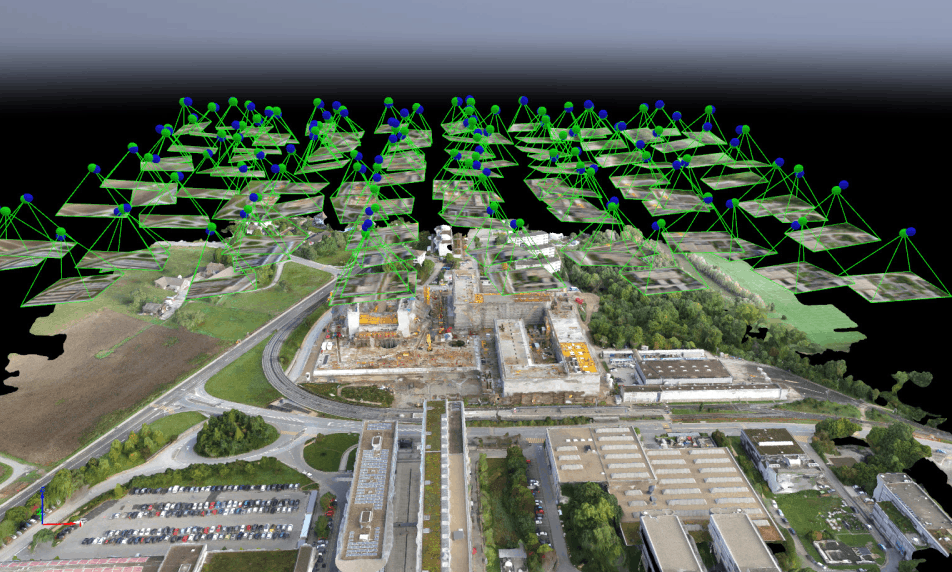
Drone software also redefined mapping. When accuracy defines mission success, photogrammetry software delivers. With the right software, UAVs can run autonomous grid missions, capturing overlapping imagery with calibrated precision across every axis. Logged flight data — from position to pitch and exposure — is then processed through AI-enhanced engines to generate high-resolution 3D terrain maps. 

PIXDcatch delivers centimeter-level 3D accuracy with RTK. Speed up data capture without compromising on accuracy.  UgCS with LiDAR offers one of the lowest AGL errors on steep terrain and impeccable automatic flights. You can also build advanced linear and corridor routes with integrated mission planning tools. 

In each case, the apps shave off hours of flight time from otherwise tedious missions, enabling ultra-detailed scans without risking surveyors on unstable ground.

4. Precision Agriculture

Farming doesn’t have to be a guessing game. With drone software processing multispectral imagery and sensor data through AI models, every field becomes a live map of its own condition. Farmers can:

  • Generate orthomosaics
  • Run stand count analysis
  • Perform plant health assessments
  • Apply targeted treatments 
  • Detect irrigation leaks and water stress zones
  • Map nutrient distribution
  • Identify weed infestations or pest damage
  • Estimate yield potential 
  • Track machinery paths to optimize field coverage

For instance, a drone equipped with a dual RGB/multispectral camera can determine the near-infrared reflectance of plants to identify early plant stress. Or you can use  NDVI or thermal data to detect irrigation issues or nutrient deficiencies before they’re visible to the eye. And this data can then be fed to variable-rate application systems to automate how much fertilizer or pesticide each zone receives.

The Big Upside of Drone Software 

The future of UAVs will be defined as much (if not more) by software than hardware. Drone software platforms like Osiris OS integrate navigation, mission control, and application management into a unified system. With that, you can develop, deploy, and manage a wide range of apps for your mission. 

Run object detection or photogrammetry software directly on the drone. Sync logs, mission data, or collected insights to the cloud or pre-process them locally — without worrying about mission security or scalability. 

Discover all Osiris Drone OS features

5 Drone Defense Myths That Wipe Out Your Budgets 

Keeping rogue UAVs far away from your premises is a resource-intensive task. But it can also become even more costly when you’re led by the wrong assumptions. If you’re shopping around for new counter-UAS tech or testing an existing anti-drone defense system, here are five myths that might be quietly draining budgets and creating risk. 

Myth 1: “One sensor will cover everything.”

Single-sensor drone defence systems (e.g., one fancy radar or one RF detector) look cheaper at first…until you wake up to missed approaches or a barrage of false alarms. Real threat actors exploit gaps: low-RCS visual approaches evade some radars, RF-silent autonomy can bypass RF detectors, and EO/IR struggles in poor visibility. 

A better approach? Design layered detection (radar + RF + EO/IR + classification) and test the whole chain in drone defence simulation scenarios, so you understand where coverage drops off. This way, you’ll know exactly where to plug in the extra budgets. 

Myth 2: “Jamming is a quick, legal fix.”

Drone jamming sounds simple: disrupting the drone comms links is enough to discourage loitering aircraft. 

In reality, jamming is legally and operationally fraught. In many jurisdictions, the use, sale, or operation of jammers is tightly regulated — and in places like the US, Canada, Switzerland, and most EU member states, it’s effectively illegal without explicit authorization. Primarily because GNSS/GPS jamming can interfere with critical comms and public safety networks. 

So before you purchase jammers for cheap online, confirm legal authority, airspace coordination, and collateral-risk mitigations. 

Myth 3: “Simulators aren’t realistic – let’s go for live trials”

Live anti-drone drills are essential, but expensive and potentially risky to conduct if used as the first validation step. 

High-quality digital twins and red/blue simulators let you run hundreds of permutations (attacker types, EM environments, sensor placements) and generate ranked vulnerability and cost-effectiveness data before you touch hardware. Doing this first reduces live-trial scope, saves money, and yields defensible reports for auditors and regulators. 

Learn how we run advanced drone defense simulation campaigns at Osiris. 

Myth 4: “False positives aren’t a big deal.”

Nope. Every false alarm is a budget drain: staff hours, wasted intercept attempts, and operational disruptions. False positives also drive alert fatigue, making security teams slower to respond to real threats. 

Start tracking the human and monetary cost of your false alerts (response time, staff hours per alert, average cost per dispatch) and demand vendors show FP rates under stress tests and in busy RF/urban environments. Industry analysis shows the operational cost of false positives is a major driver of total security spend — and often the reason projects fail to scale. 

Myth 5: “GNSS threats are niche — we shouldn’t worry.”

GNSS jamming and spoofing are not theoretical: aviation and infrastructure agencies now run coordinated programs to detect and mitigate GNSS interference because incidents are rising. GNSS interference incidents count in thousands across the Baltic states, Poland, and the Middle East, according to a May 2025 report from the European Commission

If your mitigation plan assumes constant satellite positioning, you’ve left a critical single point of failure. Test receiver resilience, inertial fallbacks, and multi-constellation checks now — and include spoof/jam scenarios in drone attack simulations and live trials. Real flight demos of GNSS-resilient navigation show how much difference receiver-level hardening and inertial solutions make.

Bottom line 

Don’t buy shiny drone defense tech to “solve” a myth. Instead: define outcomes (what “secure” looks like), run simulations to rank vulnerabilities, validate with focused red/blue tests, then run scaled live trials under regulatory oversight. That approach saves money and produces evidence you can show auditors and execs. 

For teams that want a fast, defensible baseline, consider pre-packaged red/blue simulation services that output prioritized mitigation roadmaps. That’s what our Advanced Drone Defense Simulator does — it runs OSINT-based digital twins, red/blue campaigns, and cost-effectiveness scoring so you can stop guessing and start fixing.

How to Test Your Anti-Drone Systems

Rogue UAVs are now buzzing in large quantities well outside the conflict zones.  The US FAA reported 411 illegal drone incursions near airports around the country between January to March 2025, up by 26% from the same period in 2024. Large industrial sites, government buildings, and even regular commerce establishments now often become sites of unauthorized UAV traffic. 

Regular testing of your anti-drone systems makes the difference between an intercept and an incident. Below is a concise, repeatable test playbook you can run quarterly or after any hardware, policy, or threat change — the one we use as part of our drone defence simulation service. 

1. Lock the Scope End Threat Model 

Start with an inventory of protected assets — facility footprint, critical assets, personnel, and the rules around operations (hours, no-fly corridors, public access). Then rank plausible adversary profiles. For example:

  • Hobbyist FPV intruders 
  • Organized loiter/lofted munitions
  • Spoof/jam bad actors 
  • Coordinated swarms 

Pro tip: Test your anti-drone systems against the highest-impact scenarios first. If your defences can withstand a coordinated swarm attack, it should keep you safe against more casual intrusions. 

A clearly defined mission profile also helps you keep the exercises realistic and your remediation budget well-used. 

2. Run Sample Attack Scenarios in a Digital Twin

Create a site digital twin using public imagery or blueprints, then run many attacker/defender permutations in simulation to expose weak links before putting people at risk. 

Good simulators let you vary EM environments, sensor placements, and attacker tactics. Our team likes Obriy as it renders realistic landscapes from satellite images and can be used to add real-world conditions like wind layers, radio signal interferences, and other environmental effects. 

Afterwards, score outcomes (damage vs. cost) so you can prioritize mitigations by ROI.  

You can also add statistical overlays to transform test runs into a ranked vulnerability list and cost-effectiveness heatmap. 

3. Red-Team with Professional Threat Actors

Call in experienced drone pilots and mission planners to emulate real tactics: low-altitude FPV approaches, GNSS spoof + jamming mixes, and multi-UAV saturation attacks. A good red team should have a mix of stand-off profiles and payloads. 

Prioritize blind tests where possible so your blue team’s detection and decision latency is measured under real pressure. This way, you can also evaluate the ‘human factor’ of your anti-drone defences. 

4. Validate Layered Blue-Team Responses 

As part of the exercise, test: 

  • Detection sensors (radar, RF, EO/IR) 
  • Identification logic
  • C2 timelines
  • Soft-kill (jamming, spoof-resilience) 
  • Hard-kill options (interceptors, nets)

Then evaluate the blue team’s response against KPIs such as time-to-detect, time-to-classify, time-to-mitigate, false positive rates, cost per engagement, and collateral risk. This way, you’ll get hard data for after-action reviews and some ‘proof’  to justify extra investments. 

5. Analyze, Report, Iterate 

Summarize your mission into a concise report: Scenario outcomes, ranked vulnerabilities, recommended mitigations, and an ROI table (defense spend vs residual risk). Schedule re-tests after any threat-model change and adopt a purple-team cadence where red and blue debrief, fix, then re-test.  For GNSS-threat testing, include spoof/jam detection metrics and receiver test plans — technical literature and GNSS test frameworks show how to structure those checks.

Don’t have the right resources? Our team can run baseline and advanced scenarios with professional scoring and reporting for you. Our anti-drone defence service is made for security teams who want defensible results fast — simulation outputs you can present to auditors, regulators, and execs. Ask about baseline scans, red/blue packs, and printable mitigation roadmaps 

3 Best FPV Drone Simulators on the Market Right Now 

When flying first-person view missions, the stakes are high. You can lose your new gear, crash into someone’s property, or harm yourself or (casual bystanders). So most pilots build their confidence first in FPV drone simulators. 

Below, we compare three popular options — VelociDrone, Liftoff, and Uncrashed, sharing what we like (and miss) in each one.

VelociDrone

VelociDrone is a pro-grade FPV drone racing simulator. Its key selling point: a flight experience that mirrors real-world quadcopter control almost precisely. Although its focus is competitive racing, it also allows you to sharpen your freestyle maneuvers (powerloops, matty flips, etc), thanks to ultra-realistic flight physics.  You can fly solo missions or train as a group with multiplayer sessions. At a one-time fee of just $20, VelociDrone is a super deal. 

Key features:

  • True-to-life drone handling experiences with accurate replication of real quadcopter behavior (e.g. precise throttle response, gravity, drag) 
  • Good collection of pre-made racing tracks and freestyle arenas, plus a robust track editor to build custom terrain 
  • Robust drone customization controls (e.g., PID tuning, camera angle, body frames, etc) to mimic real-world assets 

Why we love it: 

  • Top-tier realism. VelociDrone’s physics are often regarded as the most realistic among FPV sims, which is crucial for serious training and muscle memory development.
  • Efficient performance. The simulator has relatively minimalistic graphics, meaning it runs smoothly on modest PC hardware while maintaining high physics fidelity. You can expect low latency, high frame rates, and a lack of distraction.
  • Ever-fresh content. The user community always comes through with new tracks, flight scenarios, group challenges, and occasional bug fixes, making the product even more delightful.  

What’s missing: 

  • VR headset support. But you can only run VelociDrone on FPV goggles in screen mode. 
  • Native macOS application. You’ll have to rely on Windows emulation or dual-boot to use this FPV drone simulator. 
  • In-game assists and tutorials. Figuring out true-to-life controls as a beginner pilot can feel daunting. 

LiftOff 

LiftOff FPV Drone Racing from LuGus Studios is a solid runner-up. In-game graphics are more polished compared to VelociDrone. It also offers a more beginner-friendly flying experience, which allows you to hone your FPV skills without risking the real gear. You can practice freestyle tricks across a great range of environments (with trees, buildings, and other HD obstacles), plus racing flight drills. You can grab it via Steam (for Windows and Mac OS) for $19.99, with optimal DLCs available for an extra price. 

Key features:

  • Good range of realistic, immersive  environments  — from abandoned factories and parking lots to lush outdoor parks and drone racing arenas. 
  • In-simulator drone builder, allowing you to choose frames, motors, batteries, propellers, and other components. 
  • Guided tutorial modes, challenges, and a free-flight practice mode to help you progressively build out your flying skills 

Why we love it: 

  • User-friendly flight experience with a gentle learning curve and somewhat more forgiving physics to help you build out your confidence.
  • Strong immersion, thanks to ultra-realistic graphics and environmental detail that help build better spatial awareness while flying. 
  • Cross-platform availability. You can natively run LiftOFF on both Windows and Mac platforms without complicated workarounds.

What’s missing: 

  • Physics “floatiness”. LiftOff’s flight physics is less precise than VelociDrone’s. Sometimes, your digital drone has too much hang-time or requires extra tuning to behave exactly like real rigs
  • Native VR support. Like VelociDrone, Liftoff does not natively support VR headsets for an immersive FPV view. 
  • Performance optimization. To achieve consistently high frame rates, you’ll need a powerful PC with a graphics card of 4GB VRAM or more.

Uncrashed

Rounding up the list is Uncrashed — a newer drone FPV sim (first released in 2021) that emphasizes ultra-realistic graphics and immersive environments. It offers solid flight physics (continually improving via updates) and is especially appealing for freestyle practice. Its detailed maps let pilots practice acrobatic moves around realistic obstacles (like diving a parking garage or orbiting cranes at a port). Cinematographers, in turn, can hone their controls in real-world-like locations.   It is available for Windows PC via Steam for (no native Mac support). While not as feature-rich as VelociDrone or Liftoff yet, it provides a compelling value for those who prioritize visual realism in training.

Key features:

  • Loads of maps with photo-realistic locations for practicing environmental awareness. Lighting, textures, and scale are very true-to-life, which enhances immersion.
  • Credible physics with attention to drone weight and momentum for a convincing flight feel. 
  • Basic drone customization, such as camera angle, rates, and perhaps select from a few drone models or presets. However, it has fewer customization options compared to Liftoff or VelociDrone. 


Why we love it: 

  • Visual realism. Uncrashed offers arguably the most graphically immersive experience of the three FPV drone simulators. 
  • Accessible physics, which is tuned to feel realistic yet remain approachable for novice pilots.
  • Performance optimization. Despite the graphics, Uncrashed can run smoothly on mid-range gaming PCs due to good optimization of the Unreal Engine (which it’s built on). 

What’s missing: 

  • Multiplayer mode — you can only fly solo missions. Although these may be added in the future. 
  • More tuning controls for drones and physics. The current options may be limiting for pros. 
  • VR support. Despite its immersive graphics, you can still fly via a monitor only.

Final thoughts

Ultimately, the “best” simulator depends on your training goals. Compare the tradeoffs of training experience vs. flexibility vs. realism vs. cost:

  • If top-tier realism and competition prep are paramount, VelociDrone likely offers the most value despite its narrower scope.
  • If a well-rounded, visually engaging training tool is needed for a wide range of skill levels, Liftoff is a strong candidate with its balance of features.
  • If immersive graphics and budget are key factors, Uncrashed is an excellent addition, offering high-quality practice for a relatively low investment.

Beyond the Basics: What You Can Do With Custom Drone Applications

Beyond hardware, drones are becoming software-defined machines. What matters isn’t only the sensors you bolt on or the airframe you pick, it’s the drone applications you can run at the edge and connect back to the cloud. From real-time mapping to AI-driven inspections, today’s UAVs can already host a growing library of mission-specific apps. 

In this post, we’ll look at four categories of drone applications you can deploy right now: advanced navigation and control, AI and computer vision, onboard data processing and mapping, and multi-sensor fusion with specialized payloads.

Advanced Navigation & Control

Using edge-deployed drone navigation apps, drones can maintain altitude better, gain higher situational awareness, and dynamically adjust to variable conditions as a result. Modern drone autopilots come pre-furnished with features like autonomous waypoint planning, automatic takeoff and landing, GPS-denied flight, collision avoidance, and multi-drone swarming, among others — all making the flight experience smoother. 


For instance, Skydio drones have an “AI Core”, based on an NVIDIA-based edge computer and six computer vision cameras. Combined with an onboard algorithm, the setup allows Skydio drones to build a continuous 360-degree map of the surroundings, recognize objects, and calculate motion plans on the spot. This autonomy system (fully on-board) allows even non-expert pilots to perform complex maneuvers (e.g,. indoor inspections, following moving subjects) reliably. 

While Skydio’s software is proprietary and fit for its platform, you can create similar drone navigation solutions with open-source components and deploy ‘em on your hardware with Osiris AI

Sample drone applications: 

  • Autonomous waypoint navigation 
  • Obstacle avoidance & collision prevention 
  • GPS-denied navigation 
  • Autonomous takeoff/landing/RTL 
  • Drone swarming scenarios 

AI & Computer Vision

AI and computer vision, in particular,  extend UAVs’ sensing capabilities. You can run pre-trained models on-device to enable better object recognition and tracing, surface classifications, or anomaly detection. Effectively, you’re moving past data collection and towards on-the-fly (literary) situational awareness and decision-making. 

For instance, Percepto recently launched an AI-powered Emission Detector for drones. The application analyzes captured thermal and optical footage to detect methane leaks.  When it flags an anomaly, the operator receives an instant geotagged alert. And that’s just one drone application, AI enables. 

Sample drone applications: 

  • Object recognition & tracking
  • AI-assisted industrial inspections
  • Structural scanning & photogrammetry
  • Sensor-based anomaly detection

Onboard Data Processing & Mapping

Onboard data processing enables more effective mapping and drone surveying missions. Instead of waiting hours for imagery to be uploaded and processed in the cloud, UAVs can now fuse sensor data and generate usable outputs as part of the mission itself. For instance, provide real-time LiDAR previews or PPK corrections for survey accuracy mid-flight. 

DJI Zenmuse L1 LiDAR, mounted on the M300, can generate real-time 3D point clouds onboard and perform interactive preview actions (e.g., rotate, zoom, recenter) via DJI’s Pilot app. Similarly, AgEagle offers a companion app for its eBeex VTOL that allows it to collect data with geotagged images during flight and then prepares all visuals for post-processing. 

Sample drone applications: 

  • Real-time 3D LiDAR previews
  • Onboard NDVI/agriculture analysis 
  • PPK geotagging for surveys 
  • Real-time SLAM mapping 

Onboard Data Fusion & EW

Thanks to onboard data fusion, drones can get advanced capabilities for intelligence gathering — from classifying tree species for a research mission or tracking RF emitters on a battlefield. The cool part? The same onboard computer can be configured to integrate LiDAR, optical, and thermal data for scientific research, as well as drive electronic warfare payloads where speed is critical.

A recent example of the above is the MUSCLES payload tested by the US Marine Corps on an MQ-9. The kit detects hostile radar or communication signals and immediately decides whether to jam or spoof them. All waveform recognition and jamming logic runs on the payload computer onboard, removing the latency of waiting for human approval. This capability illustrates the future of edge-deployed drone applications: autonomy not just in flight, but in how sensors and countermeasures respond to dynamic environments.

Sample drone applications:  

  • Multi-sensor fusion
  • Real-time RF geolocation and triangulation
  • Electronic warfare & jamming payloads
  • Scientific edge analytics (e.g., tree classification, water sampling drones)

Takeaways 

Drone performance is no longer defined by hardware alone. What matters equally is the software running on the edge. Navigation apps turn any pilot into an expert. Computer vision models spot defects before they become failures. Onboard mapping compresses survey timelines from days to hours. Data fusion and electronic warfare enable unprecedented research and counter-maneuvers.  

The next frontier of UAV innovation is not new airframes, but the applications you deploy on them. To accelerate that future, explore Osiris AI — a drone operating system and toolkit designed for building and running modular applications directly at the edge.

3 Best Drone Operating Systems, Compared

When it comes to drone selection, most people think hardware-first. Indeed, better avionics, onboard sensors, and motors give your vehicle an edge. But software can also improve your UAV’s capabilities. Flight stability, mission autonomy, regulatory compliance, payload management, and even cybersecurity all come down to the OS running behind the scenes.

In this post, we’ll compare three popular drone operating systems — Osiris OS, PX4 Autopilot, and AuterionOS — to help you understand their strengths, limitations, and ideal use cases. 

Osiris OS

Osiris AI offers a modular drone operating system and a customizable toolchain for installing and running a wide range of drone apps — anything from advanced navigation and payload controls to mapping, AI-based object detection, and swarm management. 

The key advantage of Osiris is that it meshes modularity with execution continuity. You can seamlessly configure a wide range of hardware, software, and mission logic workflows to support different use cases. On top, you can get some cool features out of the box: real-time mission control functionality, based on live drone telemetry and logs, end-to-end encrypted mission control, and secure OTA updates to boot. 

Key features 

  • Modular, extensible API-based architecture 
  • Core flight control and autopilot functionality
  • Wide range of system customizations and extensions available
  • Built-in support for advanced autonomy and AI applications 
  • Native support for  aerial, ground, surface, and underwater UAVs
  • Built-in security and data protection features
ProsCons
Hardware-agnostic by design; portable across UAV and robotics platforms 
Supports edge processing of AI algorithms — computer vision, INS data fusion. 
Choose between local and cloud data and analytics processing 
Doesn’t have any native features for regulatory compliance 
Its app ecosystem isn’t as  is not as vast as some of the other companies 
The flip side of almost limitless customization is that it requires deeper drone engineering expertise 

PX4 Autopilot

PX4 is an open-source UAV flight control software, built as part of the Pixhawk project and now maintained under the Dronecode Foundation (Linux Foundation). 

It provides a full flight stack — sensor drivers, state estimation, control loops, mission logic — within a modular, configurable design, making it a popular choice for commercial drone applications.  Plus, it’s extremely reliable and can be additionally hardened for more complex missions. 

Key features 

  • Runs on real-time OS (NuttX) or Linux
  • Flight control firmware + middleware
  • Separate modules for sensors, estimation, and control
  • Provides telemetry via MAVLink
  • BVLOS-capable with extra ingertations 
  • Autopilot functions — stabilization, waypoint navigation, basic autonomous missions
ProsCons
Fully open-source under the BSD 3-Clause license
Large developer community, providing extensions and new autonomy algorithms 
Compatible with a companion computer (e.g., for ROS-based autonomy or to run custom apps) 
No built-in user interface. You’ll need to integrate external tools 
Out of the box, PX4 is not certified to aviation safety standards 
Requires hardware tuning and testing for each vehicle, which makes deployment resource-intensive  

AuterionOS

AuterionOS is a commercial drone operating system, built atop the PX4 autopilot and augmented with a Linux-based mission computer platform. Effectively, it positions itself as “Red Hat for drones” – taking open-source PX4 and providing a supported, integrated solution for commercial use cases. 

Under the hood, Auterion combines flight controller firmware (the PX4 flight stack) with 

an onboard Linux OS that runs on companion computers (like Qualcomm or NVIDIA-based modules). This architecture allows AuterionOS to handle UAV navigation, plus support other apps for secure communication or interfacing with cloud services.  Its clients range from DroneUp  (Walmart’s drone delivery partner) to military units within the US defence sector. 

Key features 

  • Mission Control software with granular control over flight details 
  • AI-powered autonomy for a range of use cases 
  • Built-in LTE/5G connectivity for data transfer 
  • Supports modular drone app deployment and integration of payloads
  • AutoRemote ID broadcasting and flight logging for regulatory compliance
ProsCons
Native connectivity features — automatic pre-flight checks, over-the-air updates, live video streaming, and cloud data sync 
Both hardware and software are NDAA-compliant
Allows installing custom or third-party apps on the drone’s mission computer to extend functionality
Locks you into using Auterion’s hardware (e.g., Skynode flight controller/companion modules) and cloud services
Advanced features require more power usage and more robust hardware 
Doesn’t do well in communication-denied scenarios

Takeaways

To choose between these options, consider your mission profile. What’s your key requirement — modularity, compliance, or battle-tested reliability? Each of the above stands out more in each of these categories.


Next, think about your team’s skills. Highly customizable solutions can support a wide range of ops scenarios, but they also demand more ad hoc engineering. Finally, don’t discard the ecosystem. Community support, pre-built third-party integrations, and regular updates are about as critical as the core features themselves. 

The best strategy? Pick an OS that meets today’s demands and scales with tomorrow’s challenges.

Drone Autopilot System: Top 5 Non-Negotiable Features

A drone autopilot is more than flight software. It serves as the control stack that determines whether your UAV stays stable, adapts mid-mission, and continues operating through sensor dropouts. Under the hood, it combines sensor fusion, failover logic, and real-time control loops that ensure system reliability.

In this post, we’ll break down the five autopilot features that matter from an engineering perspective, whether you’re flying commercial, research, or defence missions. 

Attitude Stabilization & Altitude Hold

Altitude hold and stabilization are fundamental drone autopilot features for all sectors — from commercial shootings to industrial inspection and ISR missions. While altitude stabilization largely falls on IMU sensors, the software on top can add extra precision.  

AI sensor data fusion algorithms can compensate for accelerometer bias and inevitable noise accumulation, plus provide predictive correction of drift,  improving stability during GNSS or barometer dropouts. Likewise, edge-hosted AI algorithms, which you can deploy with Osiris AI drone OS, can be trained on your drone’s configuration to better respond to external forces like payload shifts or rotor wash near buildings. 

Autonomous Takeoff and Landing

Most drone autopilot systems include automatic takeoff and landing sequences. In other words, your UAV can be launched and landed at a home point or alternate site with minimal inputs. 

For standard missions, autonomous takeoff and landing are a great time-saver. And this feature becomes even more crucial when visibility is poor, the takeoff space is limited, or operations demand high precision, like in cargo drops or pipeline inspections. 

In-Flight Replanning & Mode Switching

You never know when conditions could change mid-flight. So, modern drone autopilot systems like VECTOR-600 or ArduPilot now include adaptive mission controls. You can send new waypoints or change the route mid-flight using the ground station or onboard computing unit, and the autopilot will do the rest. 

For instance, if you spot a damaged section during a powerline inspection, you can add new waypoints mid-flight to capture better visuals — and then resume the original route. Or if you’re running a patrol mission and notice some suspicious activity, you can reprogram the drone to veer off the original surveillance pattern without aborting the original mission plan. 

Payload and Peripheral Integration

Autopilot drone software often provides interfaces to control payloads — cameras, gimbals, LiDARs, etc., and receive data from additional sensors. Thanks to that, you can massively increase drone functionality.

For example, stabilize a gimbal to take a crisp, close-up shot of the defect section (with the autopilot coordinating between drone attitude and gimbal movement). Or automatically turn on the photogrammetric camera once you reach the target surveying site. 

Some advanced autopilots also support sensors like optical flow modules, altimeters, or ADS-B receivers through the standard bus connections (UART, CAN, I2C, etc.). Meaning, you can implement an even wider range of extra functionality — e.g., integrate communication encryption modules or exertise thermal sensor control through the autopilot’s system. 

Sensor Failure Handling

Most commercial drones have hardware redundancy, but in some cases, it may not be enough for a safe landing. So look for autopilot systems that can handle sensor failures effectively.  If a control surface freezes or a motor fails, some autopilots can detect the abnormality and compensate using remaining controls. 

Some autopilots can counteract a failed roto. Others can detect bad sensor data (e.g., from a faulty barometer) and use alternative sensor inputs to keep a stable flight. This extra layer of resilience prevents a single-point failure from causing immediate loss — a feature especially valued in military and industrial UAVs.

Final Thoughts 

If you’re shopping around for a drone autopilot, the above features belong on your shortlist. Yet, they may not come out of the box from one provider or be well above your budget. But there’s no need to compromise. 

With the Osiris AI modular platform, you can install, manage, and run extra software on your drone to enable the features you need. Request a free demo to discover what’s possible for your UAV.